FirmFlowFirmFlow

HOW IT WORKS

Everything you need to
run your firm

FirmFlow replaces DocuSign, QuickBooks, ShareFile, and your practice management tool with one platform. Here is exactly how each feature works.

Start free trialBook a demo
Dashboard Engagements Documents Signatures Tasks Time Invoices Clients Messages Calendar Analytics AI Team Recurring Settings

Dashboard - Your firm at a glance

The moment you log in, you see everything that matters. Revenue overview, active clients, pending signatures, overdue invoices, and upcoming deadlines - all in real time.
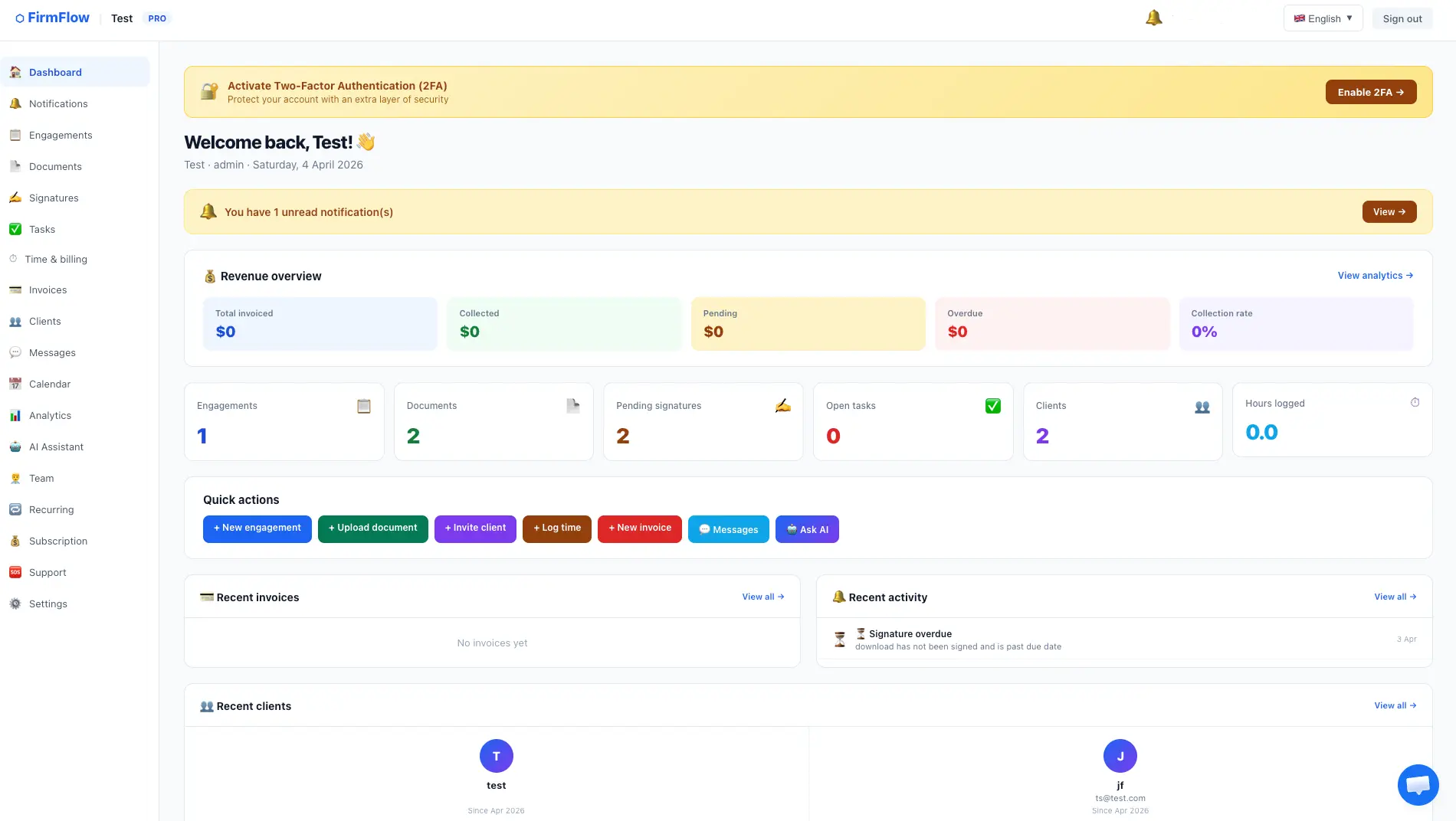
Revenue overview shows total invoiced, collected, pending, overdue amounts and collection rate
Quick stat cards show engagements, documents, pending signatures, open tasks, clients, and hours logged
Quick action buttons to create engagements, upload documents, invite clients, log time, create invoices, send messages, and ask AI
Recent invoices section shows your latest invoices with status and amounts
Recent activity feed shows the latest actions like signature requests and overdue alerts
Recent clients section shows your newest clients with their join date
firmflow.org/dashboard/
Dashboard - Your firm at a glance

Engagements - Manage every client project

Create and track engagements for every client. Set types like Tax, Audit, or Consulting. Assign budgets, deadlines, and track status from Active to Closed.
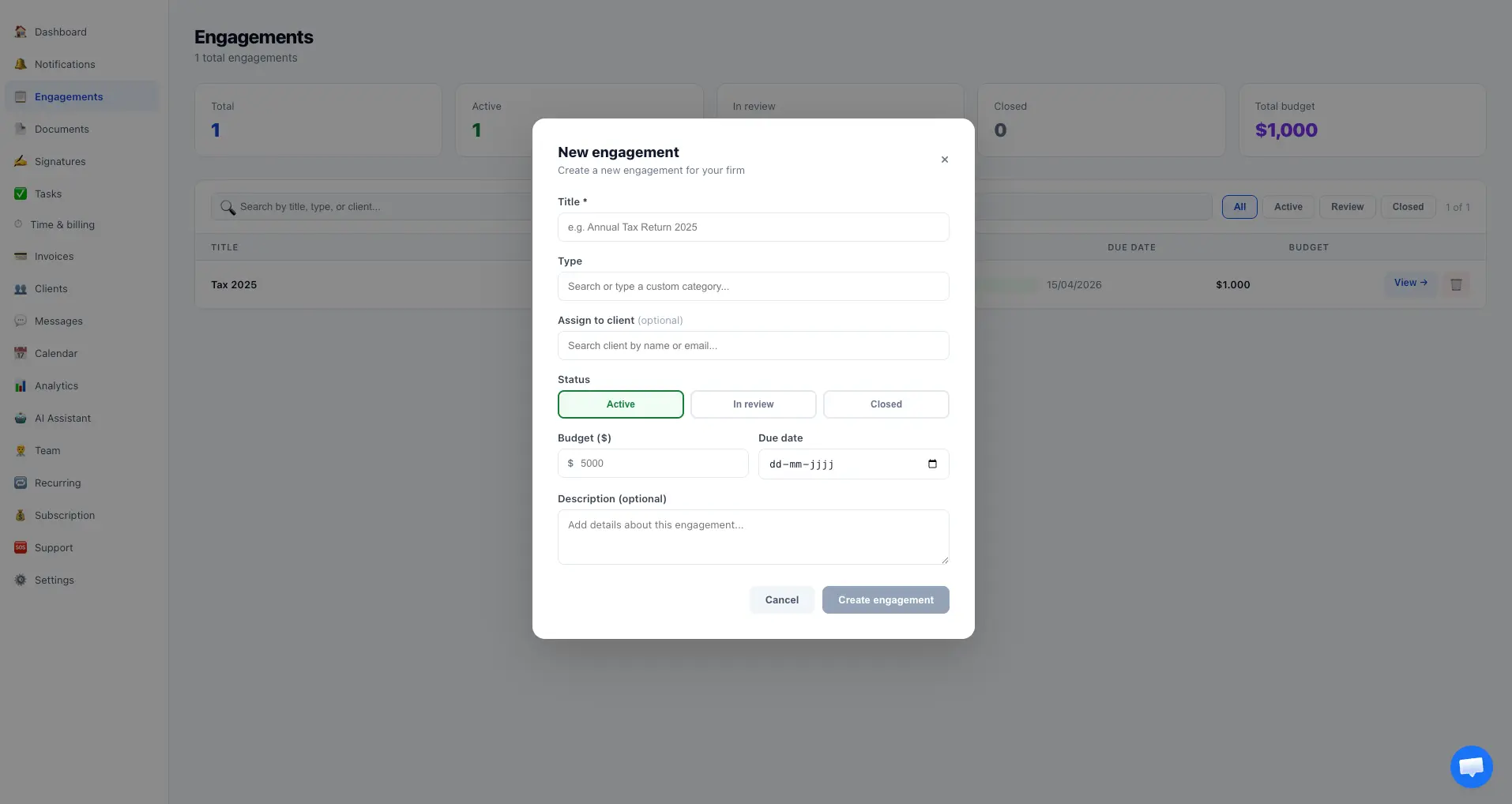
Create engagements with title, type (Tax, Audit, Consulting, etc.), and budget
Assign engagements to specific clients from your client list
Track status: Active, In Review, or Closed with easy filter and search
Set due dates and budgets - see total budget across all engagements
Add optional descriptions with details about the engagement scope
View detailed engagement page with linked documents, invoices, and time entries
firmflow.org/dashboard/engagements
Engagements - Manage every client project

Documents - Secure file management

Upload, organize, and share documents with your clients. Drag and drop any file type. Choose whether documents are visible to clients or internal only.
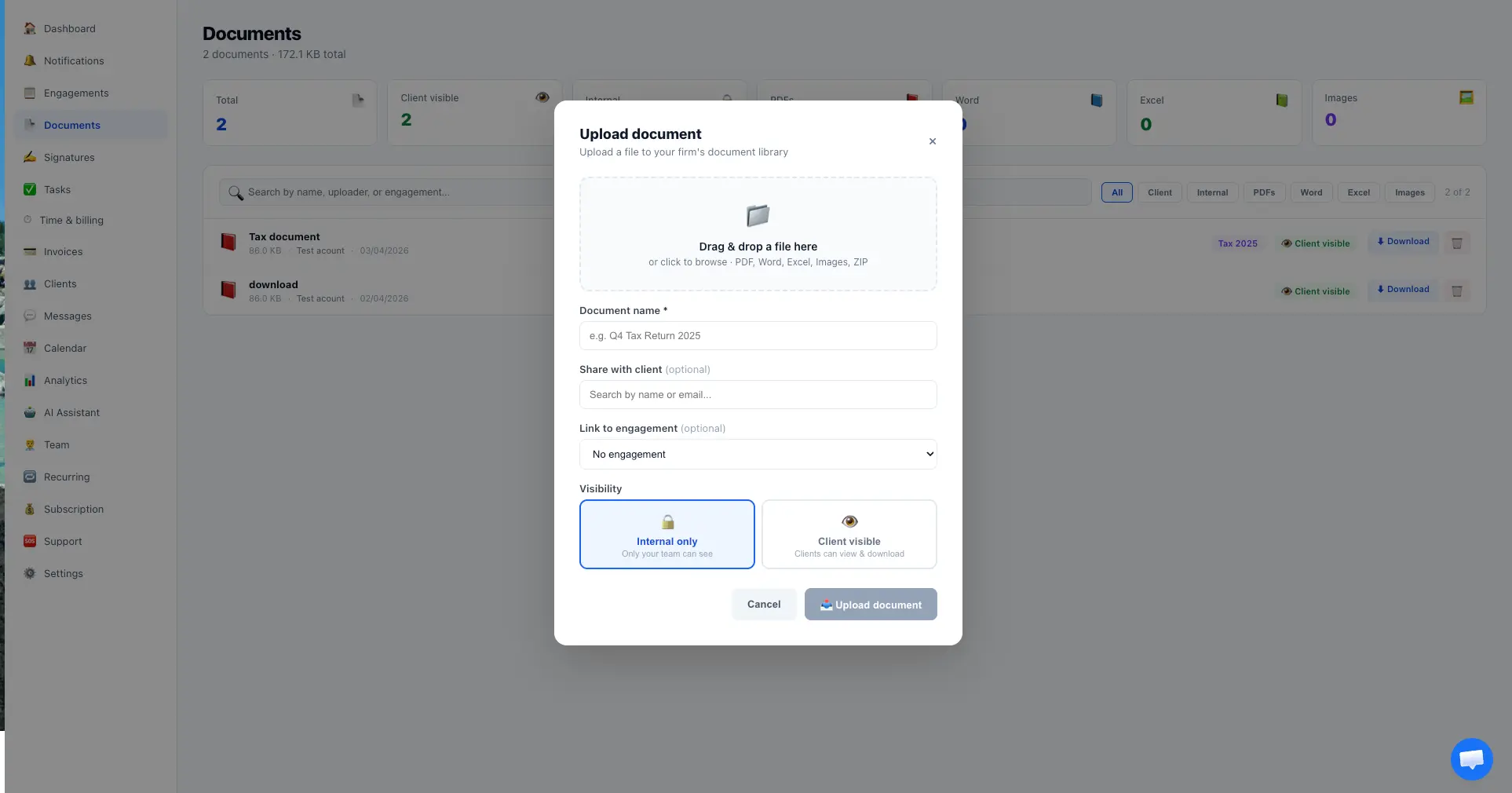
Drag and drop to upload PDF, Word, Excel, images, and ZIP files
Name each document and optionally share it with a specific client
Link documents to engagements for organized project tracking
Set visibility: Internal Only (team only) or Client Visible (clients can see and download)
Filter documents by type: All, Client visible, Internal, PDFs, Word, Excel, Images
Search documents by name, uploader, or engagement
firmflow.org/dashboard/documents
Documents - Secure file management

E-Signatures - Get documents signed in minutes

Send any document for legally binding electronic signatures. Select a document, choose the client, add an optional message and due date, and click send. Clients sign from any device.
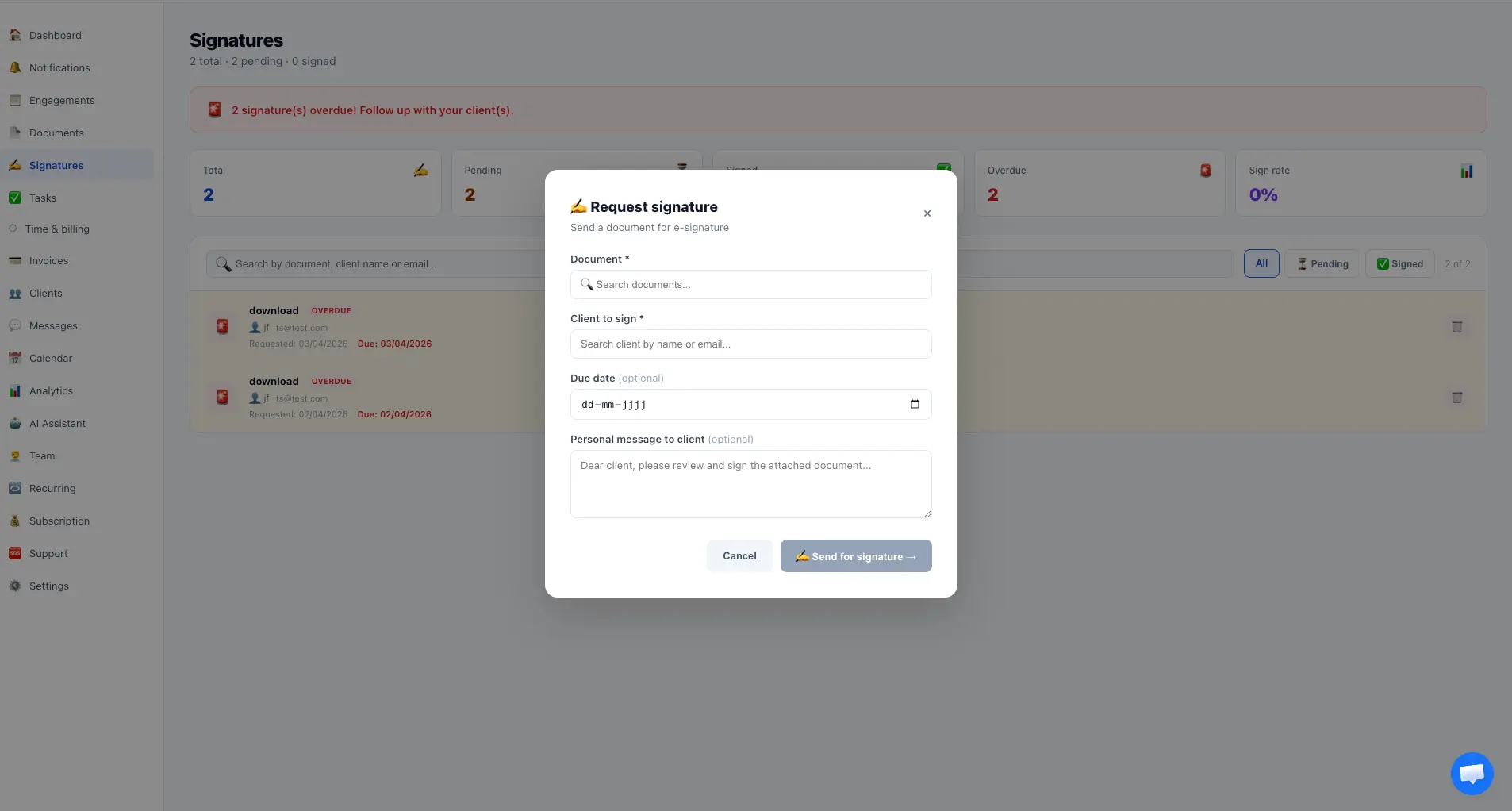
Select any uploaded document from your library to request a signature
Search and select the client who needs to sign
Add a personal message to the client explaining what they are signing
Set an optional due date - overdue signatures trigger automatic notifications
Client receives an email with a direct link to sign on any device
Track signature status: Pending, Signed, or Overdue with sign rates
Legally binding under the ESIGN Act (US) and eIDAS (EU) - no extra cost
firmflow.org/dashboard/signatures
E-Signatures - Get documents signed in minutes

Tasks - Stay on top of everything

Create tasks with priorities, assign them to team members, link them to engagements, and set due dates. Track completion rates and never miss a deadline.
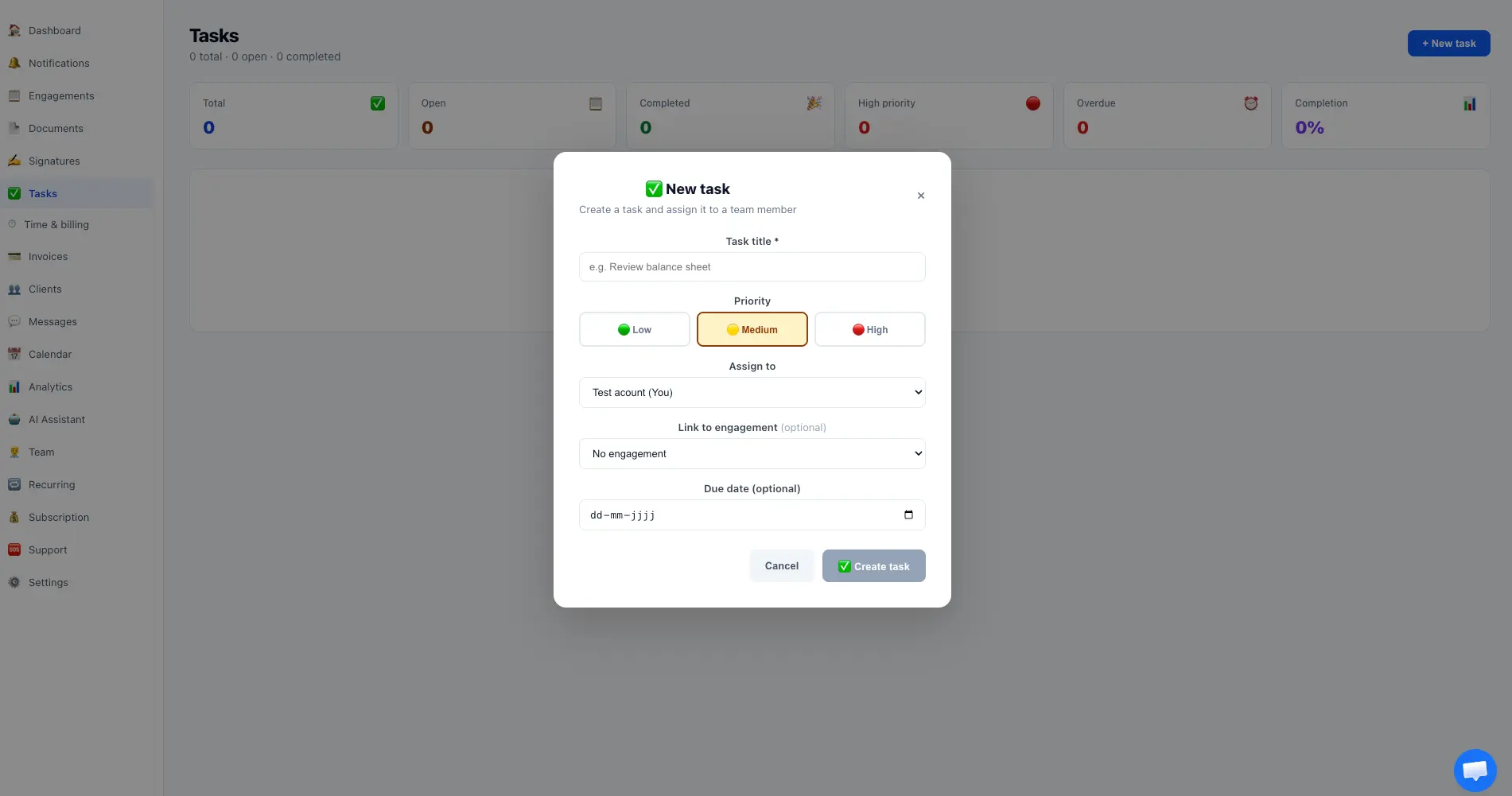
Create tasks with a title and priority level: Low (green), Medium (yellow), or High (red)
Assign tasks to any team member from a dropdown
Link tasks to specific engagements for organized project tracking
Set optional due dates and get notified when tasks are overdue
Dashboard shows total, open, completed, high priority, and overdue task counts
Track completion rate percentage across your team
firmflow.org/dashboard/tasks
Tasks - Stay on top of everything

Time Tracking - Log billable hours

Log time entries with a description, number of hours, and date. Track total hours, billed hours, and unbilled hours across your firm.
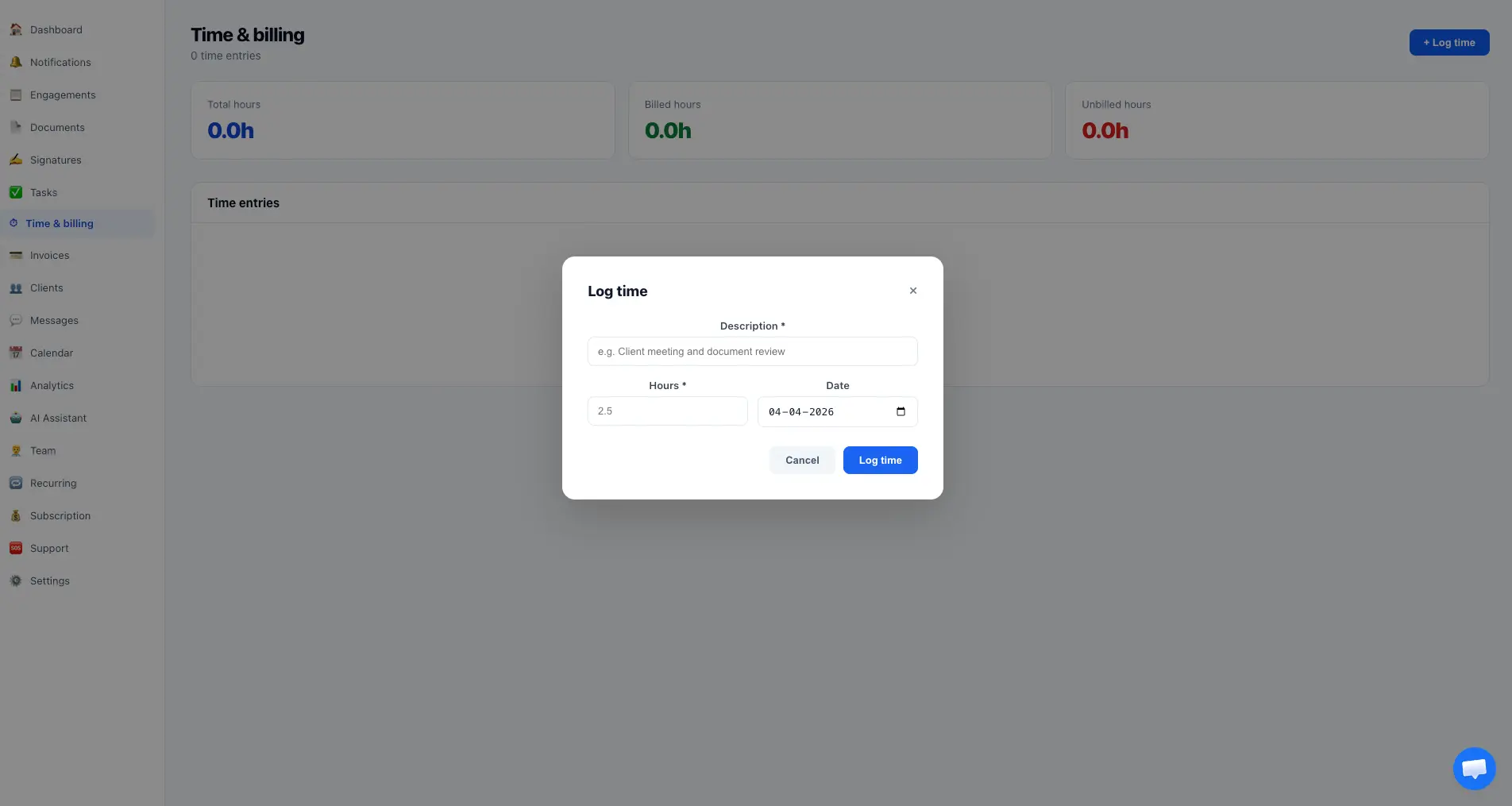
Log time with a description of the work performed
Enter hours (supports decimals like 2.5 hours) and select the date
Dashboard shows total hours, billed hours, and unbilled hours
Time entries can be used to generate invoices automatically
View all time entries in a sortable list with date and description
firmflow.org/dashboard/time
Time Tracking - Log billable hours

Invoices - Get paid faster

Create professional invoices with automatic numbering, multi-currency support, Stripe payment links, bank transfer details, and tax rates. Send by email with one click.
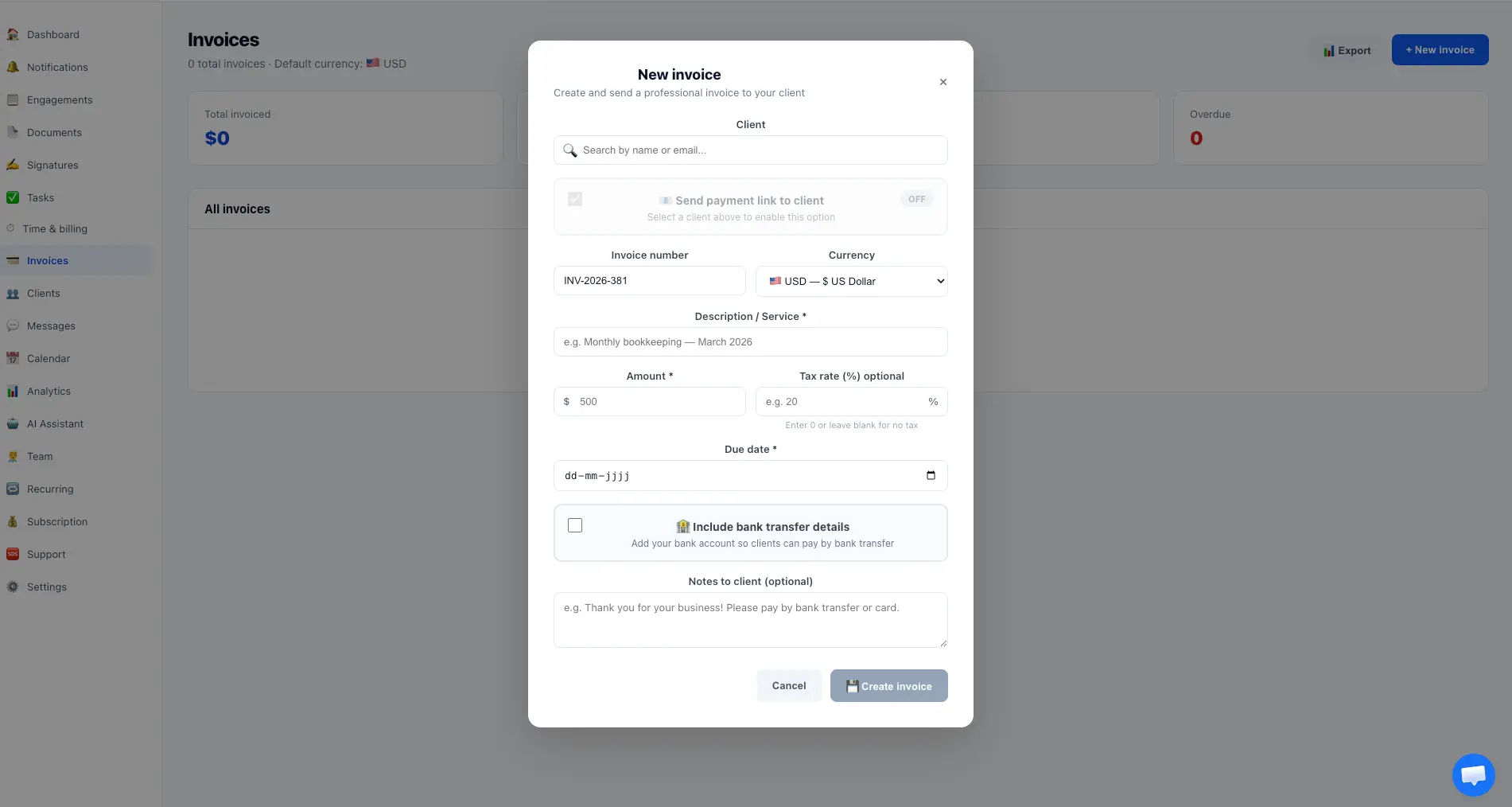
Select a client and toggle Stripe payment link on or off
Automatic invoice numbering with customizable currency
Add service descriptions, amounts, and optional tax rates
Set due dates and add optional notes to the client
Include bank transfer details so clients can pay by wire transfer
Download invoices as professional branded PDF documents
Support for 10 currencies: USD, EUR, GBP, CHF, CAD, AUD, SEK, NOK, DKK, PLN
firmflow.org/dashboard/invoices
Invoices - Get paid faster

Clients - Your client portal

Invite clients to their own branded portal. They can view documents, pay invoices, sign agreements, and message your team from one login.
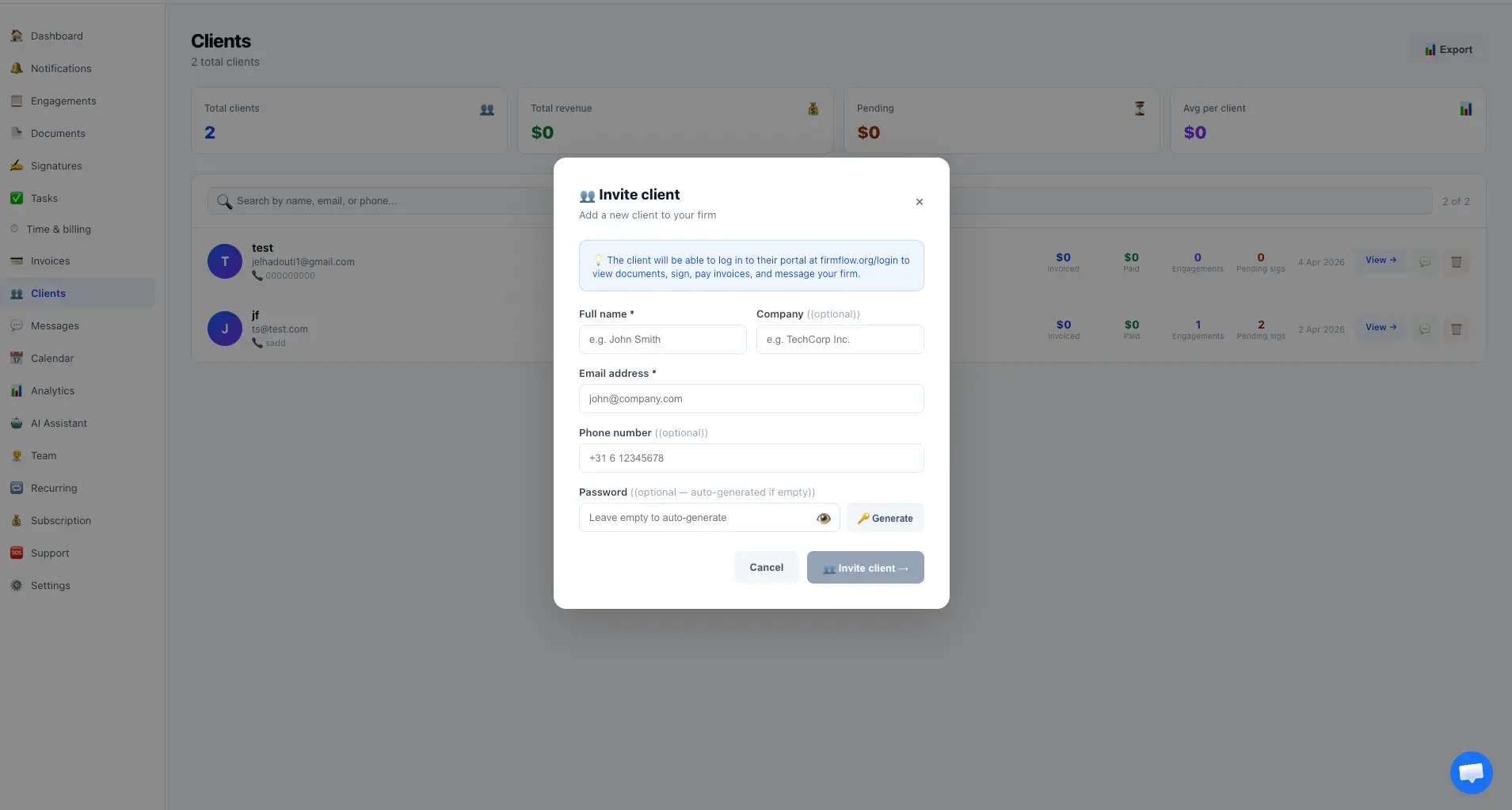
Invite clients with name, email, company, and phone number
Auto-generate or set a custom password for the client portal login
Clients log in at firmflow.org/login to access their portal
View client overview: invoices sent, amount paid, engagements, and pending signatures
Search and filter clients by name, email, or phone
Export your client list for your records
firmflow.org/dashboard/clients
Clients - Your client portal

Messages - Secure client communication

Start conversations with clients organized by subject. Real-time messaging replaces email threads with secure, organized chat.
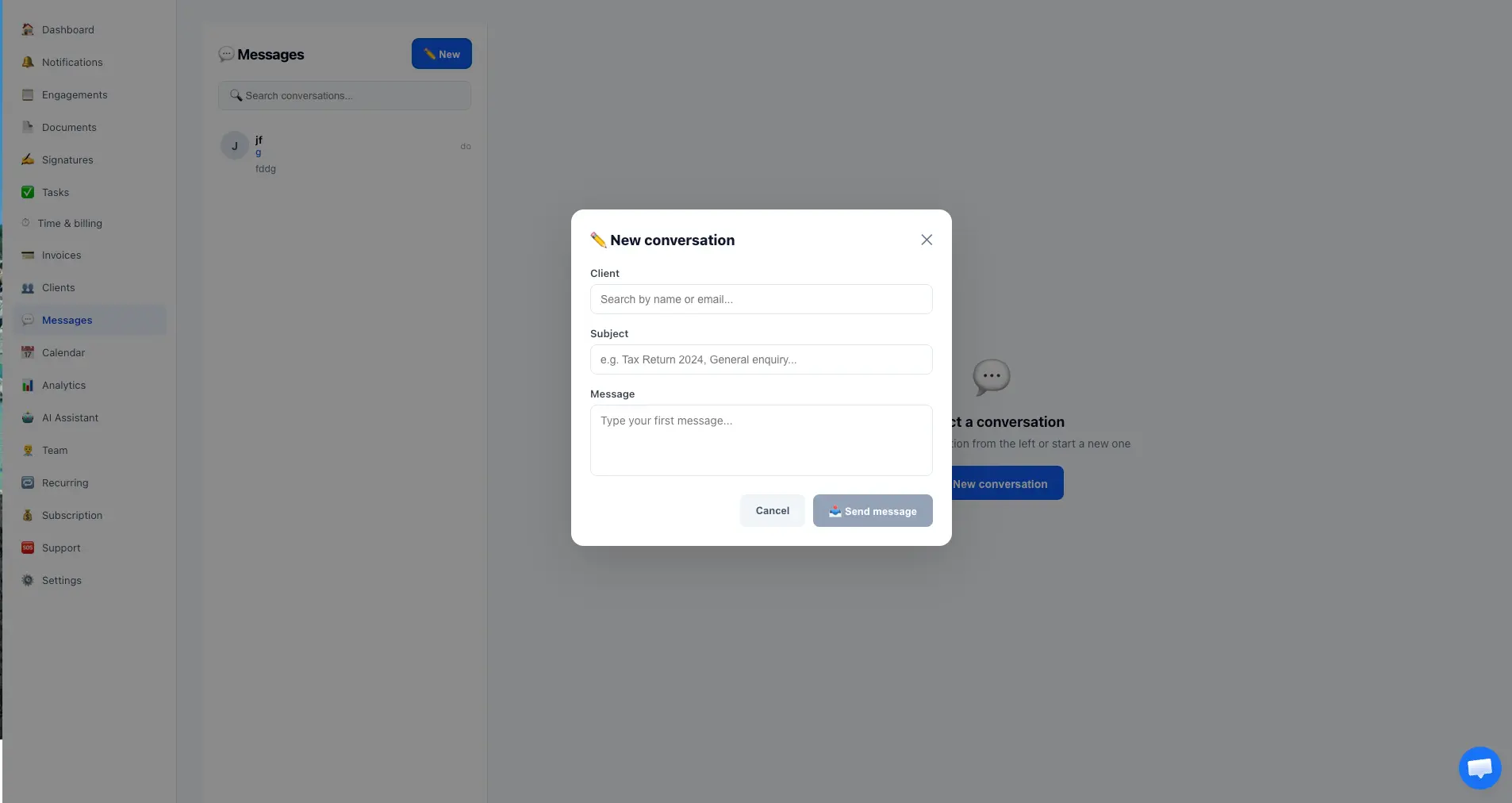
Start new conversations with a client, subject line, and initial message
Conversations are organized in a sidebar for easy switching between clients
Clients can reply from their portal and you get instant notifications
Search across all conversations to find any message quickly
Encrypted and secure - safer than email for sensitive client information
firmflow.org/dashboard/messages
Messages - Secure client communication

Calendar - See all deadlines at a glance

A visual monthly calendar showing all your engagement deadlines, invoice due dates, and signature deadlines with color-coded events.
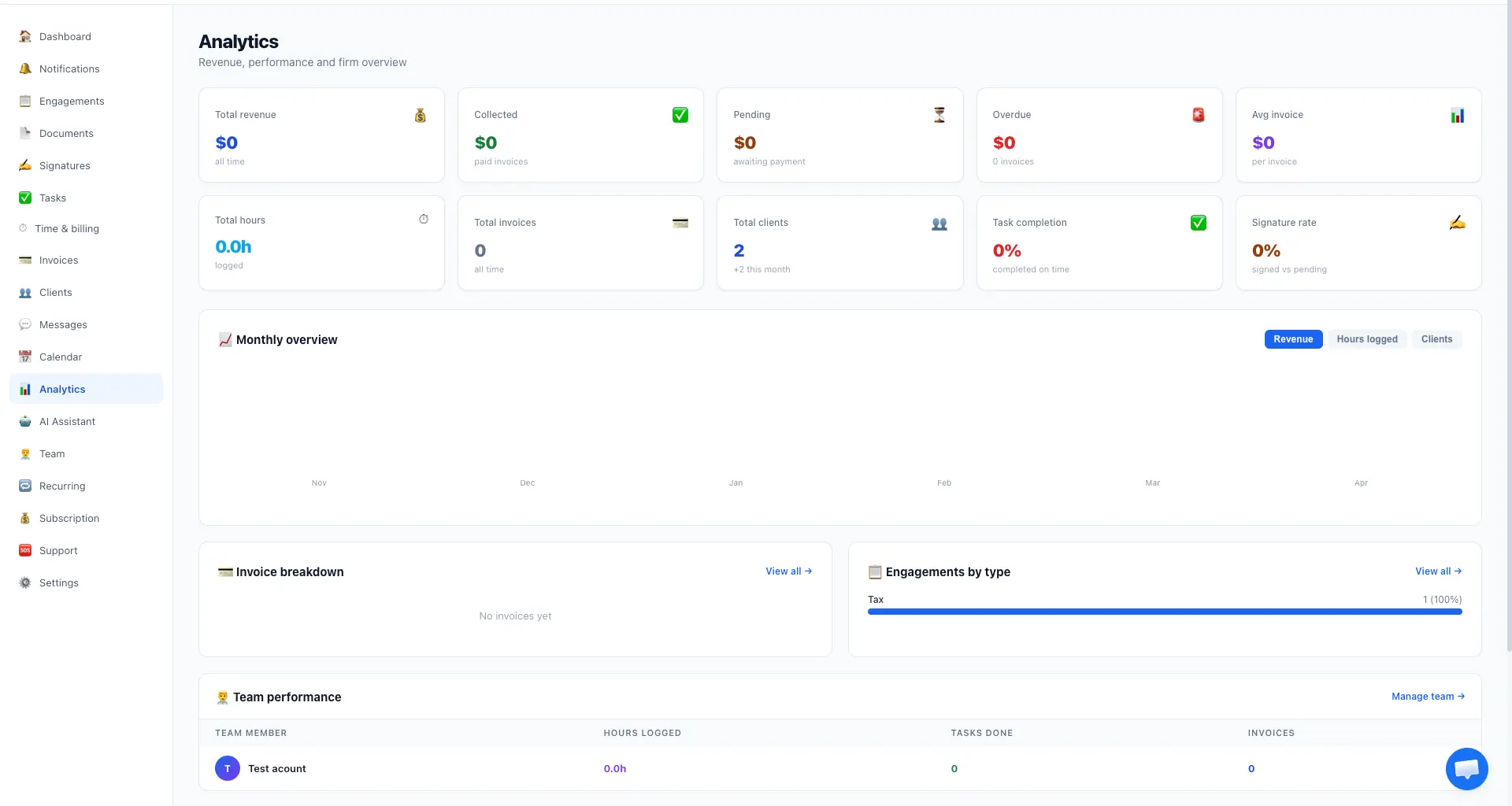
Monthly calendar view with color-coded events for each type
Blue for engagements, purple for tasks, red for invoices, brown for signatures
Switch between Month view and List view
Navigate between months with arrow buttons or jump to today
firmflow.org/dashboard/calendar
Calendar - See all deadlines at a glance

Analytics - Know how your firm is doing

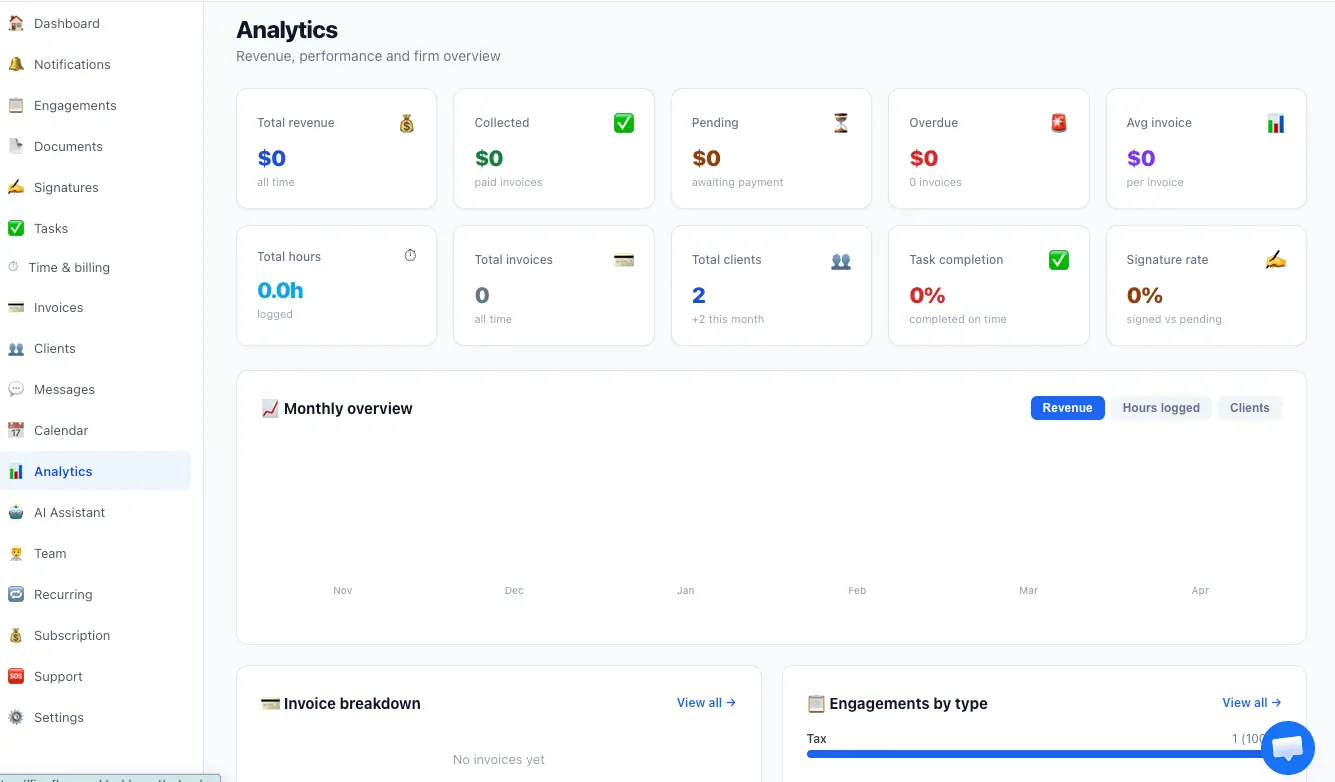
Comprehensive analytics dashboard with revenue overview, collection rates, team performance, engagement breakdown, and monthly trends.
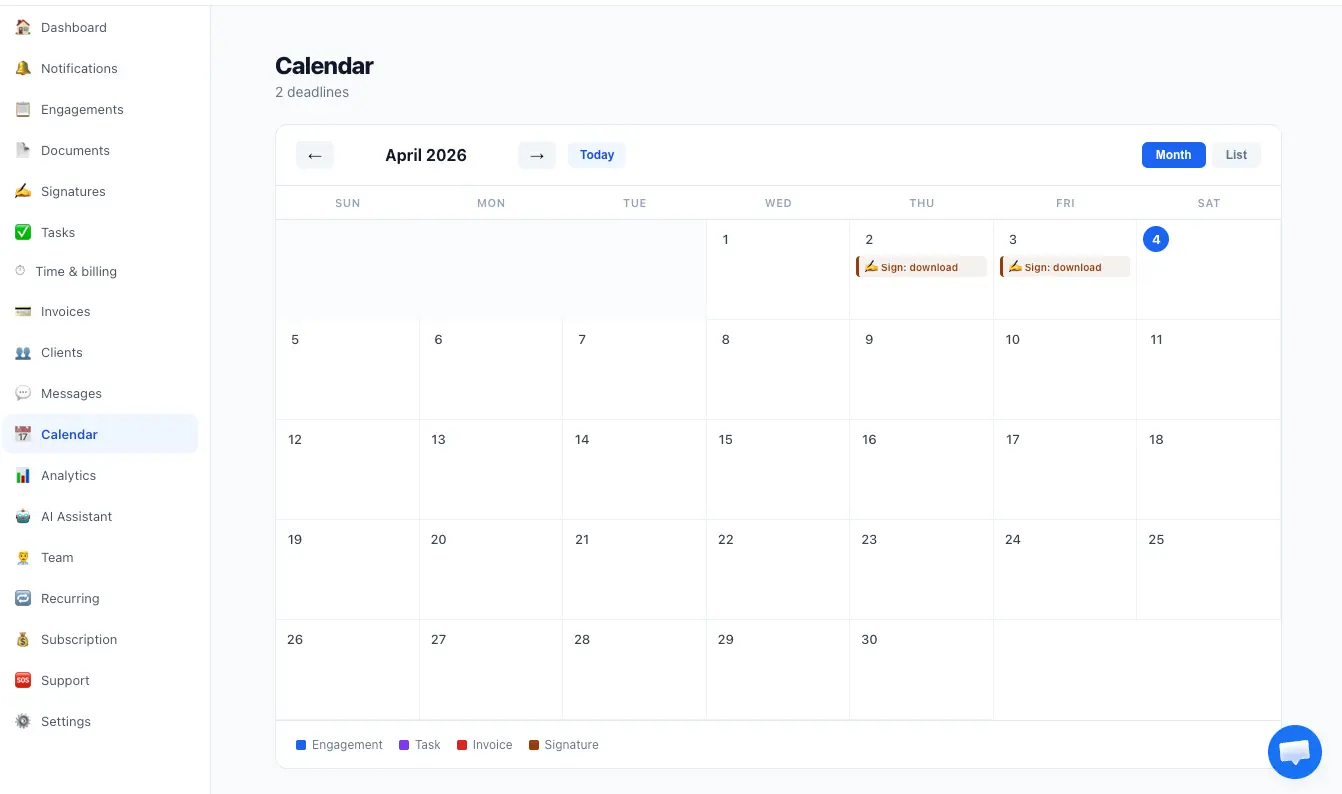
Revenue cards: total revenue, collected, pending, overdue, and average invoice
Monthly overview chart with toggles for Revenue, Hours logged, and Clients
Invoice breakdown and engagements by type (Tax, Audit, etc.)
Team performance table: hours logged, tasks done, and invoices per member
Key metrics: total hours, invoices, clients, task completion rate, and signature rate
firmflow.org/dashboard/analytics
Analytics - Know how your firm is doing

AI Assistant - Instant firm insights

Ask questions about your firm in plain language. Powered by Claude AI, the assistant analyzes your actual revenue, clients, invoices, tasks, and team data to give real answers.
Pre-built prompts: business overview, revenue trends, overdue invoices, top clients, and more
Type any question like Which clients have overdue invoices or How is our revenue trending
Get actionable recommendations to improve firm performance
Analyzes YOUR actual firm data - not generic advice
Available in the Pro plan at 89 per month - powered by Claude AI
firmflow.org/dashboard/ai
AI Assistant - Instant firm insights

Team - Roles and permissions

Invite team members with granular role-based permissions. Choose Admin or Staff roles, control which pages each person can access, and set data visibility levels.
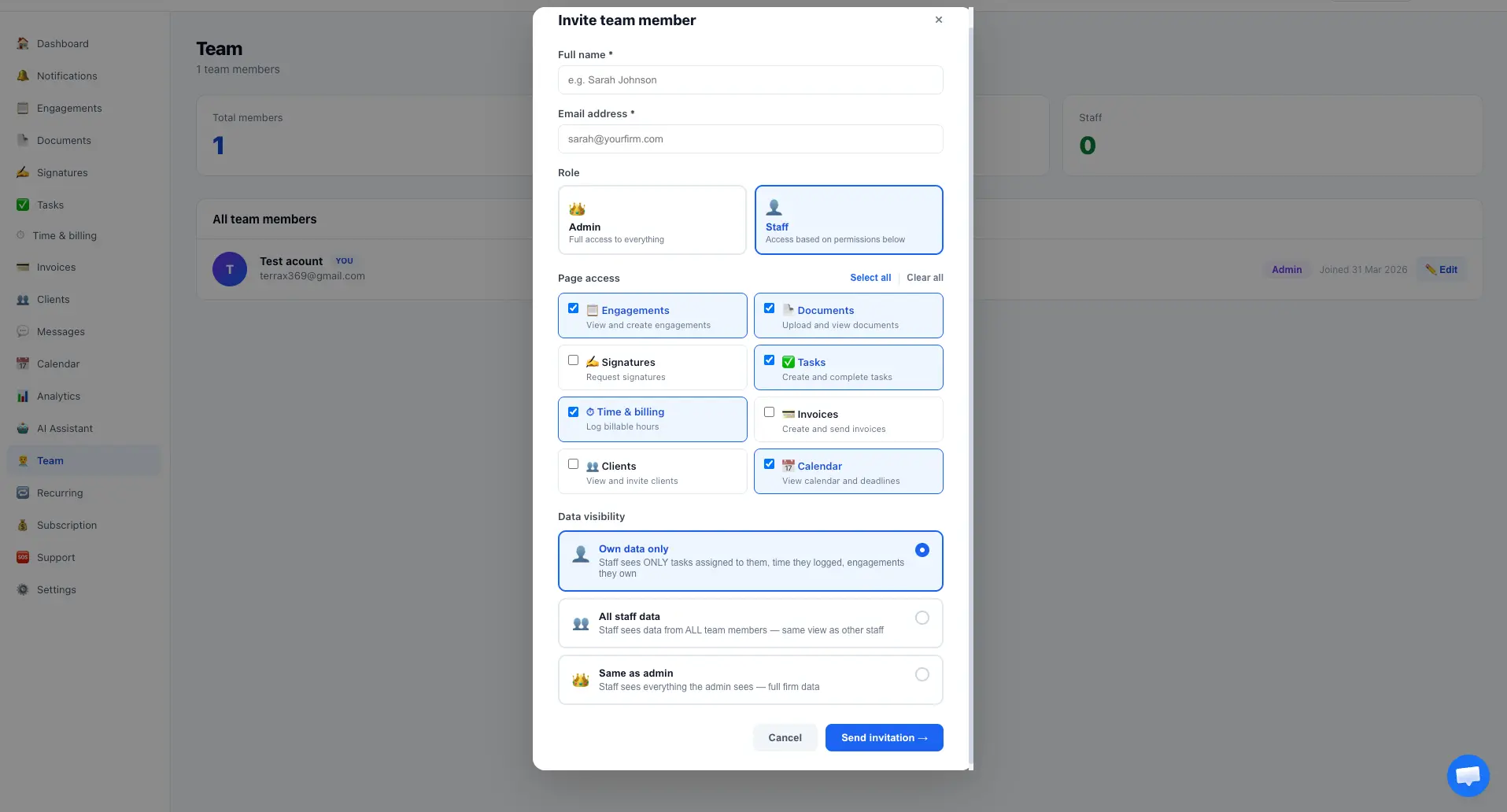
Invite members by name and email - they receive a link to join
Choose role: Admin (full access) or Staff (customizable page access)
Control page access: toggle Engagements, Documents, Signatures, Tasks, Time, Invoices, Clients, Calendar individually
Set data visibility: Own data only, All staff data, or Same as admin
No per-user fees - invite your entire team at no extra cost
firmflow.org/dashboard/team
Team - Roles and permissions

Recurring Invoices - Automate your billing

Set up automatic invoicing for retainer clients. Choose frequency, amount, and dates. FirmFlow generates and sends invoices automatically.
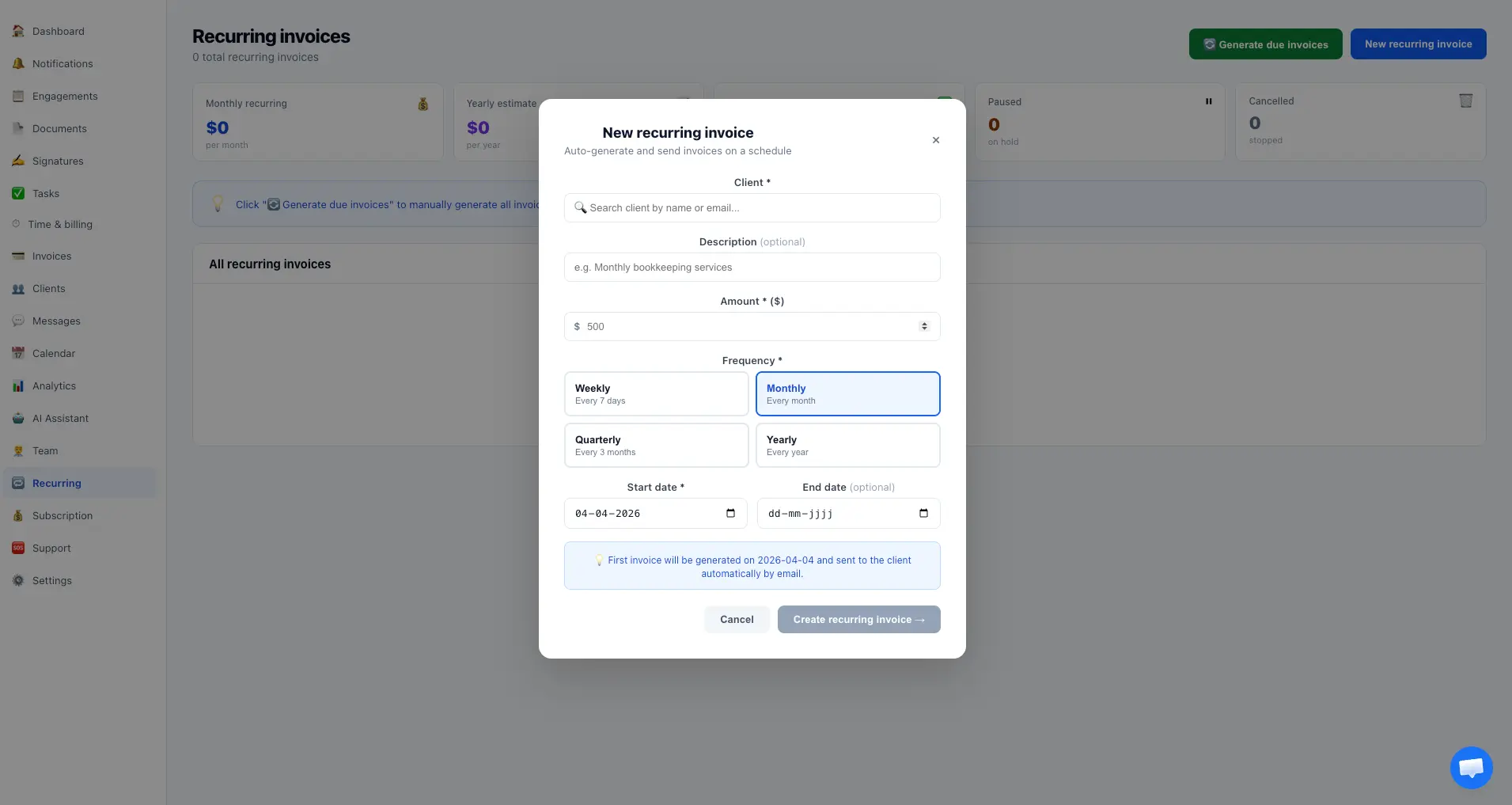
Select a client and set the recurring invoice amount
Choose frequency: Weekly, Monthly, Quarterly, or Yearly
Set start and optional end dates
Track monthly recurring revenue and yearly estimates on the dashboard
Pause or cancel recurring invoices at any time
firmflow.org/dashboard/recurring
Recurring Invoices - Automate your billing

Settings - Make it yours

Customize every aspect of FirmFlow: language, branding, firm information, currency, payment terms, bank details, two-factor authentication, and profile management.
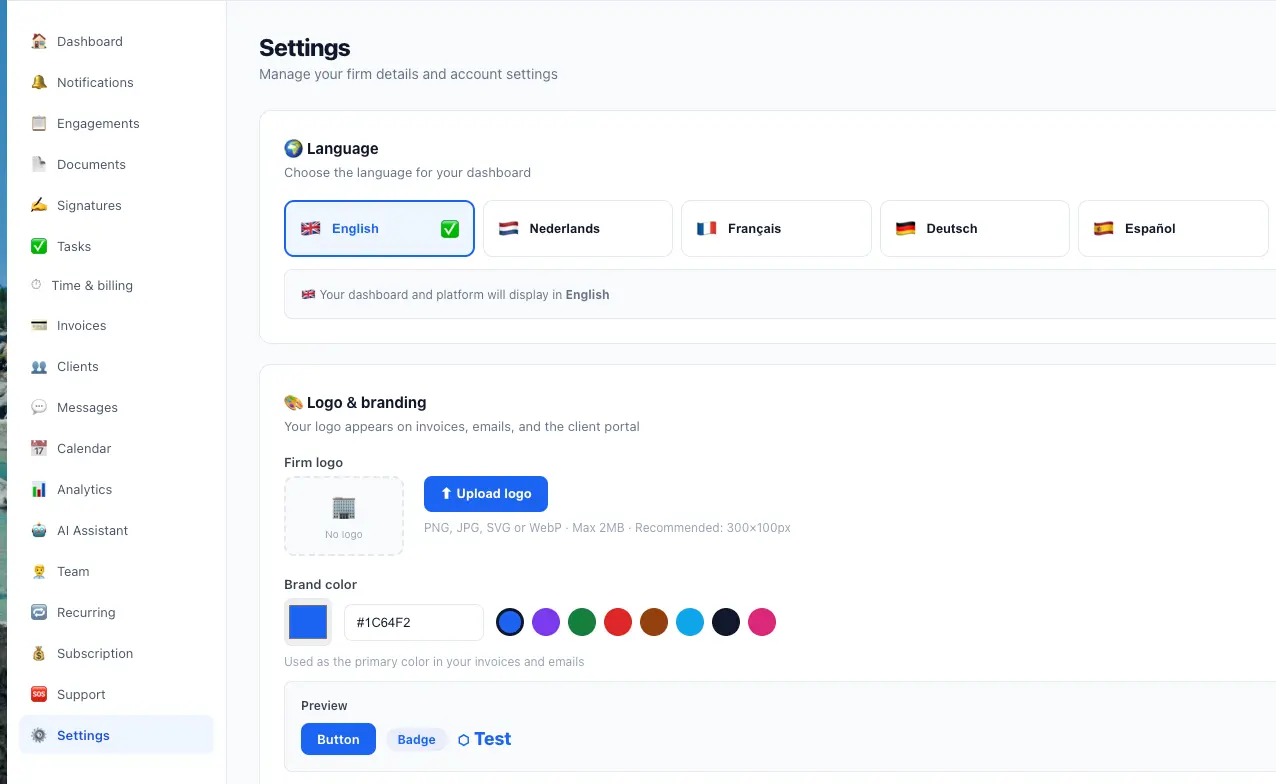
Choose your dashboard language: English, Nederlands, Francais, Deutsch, or Espanol
Upload your firm logo - appears on invoices, emails, and the client portal
Choose your brand color from 8 preset options or enter a custom hex code
Set firm details: name, email, phone, tax number, address, city, and country
Select your default currency from 10 options: USD, EUR, GBP, CHF, CAD, AUD, SEK, NOK, DKK, PLN
Enable two-factor authentication (2FA) for extra account security
Manage your profile, view your role and plan, set payment terms, and add bank details for invoices
firmflow.org/dashboard/settings
Settings - Make it yours

All of this for $29/month

No per-user fees. Your entire team is included.

14-day free trial. No credit card required. Set up in 10 minutes.

Start free trialView pricing